
TL;DR
- Both Meshtastic and MeshCore work on the same LoRa radios – you can switch your radio to the one or the other network by reflashing its firmware
- You cannot message users on the other network, you’re either on Meshtastic or you’re on MeshCore
- Both networks have similar features i.e. a public channel, private channels, encrypted private messaging, and are text based chats
- Both use the license-free 868 MHz or 433 MHz bands in South Africa
- Difference is Meshtastic floods every message to every device within it’s 7 hop limit which can get noisy with a very large network
- MeshCore works out specific routes through repeaters and can go through up to 64 hops, so better for very big networks where bandwidth is restricted
- Meshtastic carries on working no matter who leaves it so no pressure to move to MeshCore – fewer users may just mean it struggles to get through across distances
- It is just HAMNET who may switch their high site nodes to MeshCore, so those high sites may not be available to Meshtastic users in future
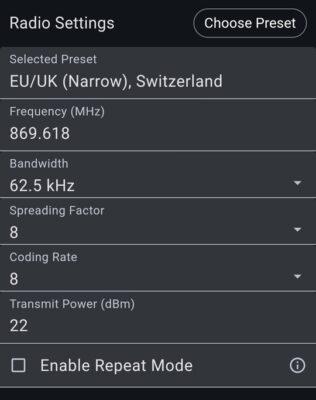
- MeshCore in Cape Town is on preset EU/UK (Narrow), Switzerland – 869.618 MHz, Bandwidth: 62.5 kHz, Spreading factor: 8, Coding rate: 8
- Meshtastic is better at ad-hoc mobile networking, whilst MeshCore is better at using static repeaters and connecting across big cities or a whole region
- TL;DR
- Considerations
- Common Functionality between Meshtastic and MeshCore
- MeshCore features that Meshtastic does not have
- Meshtastic features that MeshCore does not have
- Migrating to MeshCore
- How to Flash your Radio and Connect on MeshCore
- How to Flash your Repeater Node
- Websites and Links
- Basic MeshCore settings
- Repeater Settings
- MeshCore Tips
- Add yourself to the MeshCore Map
- MeshCore Official App Frequently Asked Questions
- Which Companion Node Chat App To Use
- How Duty Cycle works
- MeshCore Channel Types
- MeshCore Regions
- Using APRS with MeshCore?
- Mobile Use
- MQTT Support
- Monitoring and Bridging Apps
- Growth in Cape Town
- Tips for the open-source MeshCore Open app
- Diagnosing Issues
Considerations
As HAMNET operators we have to consider the EMCOMM (Emergency Communications) implications for radio communication. It is a question of what will be the most effective communications medium when there is blackout of cellular and Internet communications.
Whilst everyone is free to choose to use whatever they want to, our goal is to promote and support what we deem to be the most effective for EMCOMM purposes. Meshtastic started out very well and has been adopted by a good 216+ nodes right across Cape Town, and even stretching over Du Toit’s Kloof mountains to Worcester. The idea behind Meshtastic was to bridge communications between Disaster Management centres and the ordinary citizen who does not have access to licensed radio bands.
Whilst Meshtastic works very well while the number of nodes (and resulting network traffic) is low, it could become flooded during emergencies, or even if someone decides to set up a node to DDoS (Distributed Denial of Service Attack) the network. This is because Meshtastic broadcasts everything to everyone within range, up to 7 hops away. It can get worse if someone links their downloaded MQTT posts and rebroadcasts those locally.
HAMNET has a number of high sites where it provides radio nodes for communication. Primarily these are amateur radio repeaters that require license to use, but right now HAMNET is considering migrating its Meshtastic nodes at these high sites to MeshCore. The following paragraphs are some of the reasoning that is being discussed during May and June 2026.
Meshtastic may still be best for highly mobile operations in a dynamic environment like rescuers operating in a mountainous region where there is no repeater node to cover everyone (although we must test the MeshCore SAR app functionality, and now the MeshCore companion nodes can also enable repeating between nodes) , as chat messages will hop/relay through whoever your node can reach.
MeshCore can be best in a busy city where there are hundreds of nodes and a 64 hop limit allows you to reach right across the city. Potentially MeshCore could reach across a province or a country, but the key requirement is having repeater nodes that are reachable to route traffic. MeshCore makes this possible because it finds and remembers static routes that optimise the network traffic versus just flooding all nodes. Cape Town does have a few high sites such as Table Mountain, Tygerberg Hills, and Du Toit’s Kloof mountain. So as long as there are MeshCore repeater nodes operating on those high sites, MeshCore can be very suitable for Cape Town. With MeshCore’s better network routing, there is less flooding across the network, and it allows for better throughput on the network, and a better chance of reaching your target node.
MeshCore is built as a structured “managed grid” or backbone. It separates devices into Companions (handhelds that do not relay) and Repeaters (fixed infrastructure that handles all forwarding). MeshCore uses path-based routing; it floods to discover a route once, then “learns” and embeds that path in future messages, keeping the air waves much quieter.
MeshCore provides explicit delivery confirmation, showing the user exactly how many retries were attempted and whether the message succeeded or failed. Meshtastic’s confirmation has historically been more ambiguous, though it is improving.
MeshCore also does not have the hard limit set in Meshtastic for only 8 channels. MeshCore’s channels are software based (cryptographic keys) so there is theoretically no limit, although one app shows 31 channels. See the channels section below for more on how to use this.
Common Functionality between Meshtastic and MeshCore
- Text Based – both are text based messaging apps intended to work on LoRa radios with very low bandwidth in the free-to-use (license-free) bands.
- Broadcasting – Like Meshtastic has the LongFast channel, MeshCore can also broadcast to all nodes for emergency alerts from say Disaster Management, or from any node needing urgent assistance.
- Privacy – message content of both are encrypted.
- Group Channels – both have a public channel and private group chats that be set up. Interestingly, MeshCore uses flood routing for these groups chats rather than MeshCore’s typical directed path routing.
- Private group channels – both allow for these types where a password is required to access the group channel.
- Rooftop nodes – a node inside a home is not always able to reach a repeater node, so it is useful to have a second node placed higher up (in a tree, on a chimney, on a pole) so that the inside node can relay through that rooftop node. Both networks can do this. Meshtastic can have any node type on the rooftop (they all do repeating), whilst MeshCore will require that rooftop node to be flashed with repeater firmware.
- Hardware – MeshCore should work on exactly the same LoRa hardware that Meshtastic does. No-one should have to replace their existing hardware. They just need to save their settings, flash either the companion (user) node or repeater node firmware, and connect with your app to manage the node. You can revert to Meshtastic if you wish to, but just remember to save your settings.
- Application – both have Android, iOS, web, etc apps that connect via Bluetooth to the radio node.
- IoT and Telemetry – both will connect sensors, trackers, and automation devices. Monitor your environment off-grid with the same resilient mesh network. Meshtastic nodes are configured to broadcast their status (battery, voltage, GPS) and environmental data (temp, humidity, air quality) at set intervals (e.g., every 15 minutes). MeshCore treats telemetry as a resource to be managed carefully to avoid “mesh noise,” making it better for permanent, large-scale deployments. By default, MeshCore nodes (specifically the “Sensor” role) sit silently. They do not broadcast. You must explicitly “poll” a node from a companion app to retrieve its current data. MeshCore supports configurable periodic broadcasts (every 15–60 minutes) for battery, GPS, and environmental data. See Channels section for how to optimise these devices on the network.
- Open Source – both have their core firmware and routing protocol as fully free and open source software. Meshtastic apps are all open source, whilst MeshCore has its community apps as open source, the primary cross-platform mobile app (by Liam Cottle) is not open source (it is free to download, but a one-time payment is required to unlock it’s advanced feature – right now it delays accessing remote management of a repeater node by 10 seconds on the free app), and the MeshOS app is fully paid only. MeshCore-Open: An Android/cross-platform app is designed to be a fully open alternative to the official MeshCore client, and if used, then the full stack of MeshCore is open source. What makes this open source app impressive is it has quite a few extra tweaks you can apply to the radio and messages, and shows some interesting stats and path visualisations too, offline map caching, and even AI translations (probably for Europe).
MeshCore features that Meshtastic does not have
- Room servers – these function like a simple Bulletin Board System (BBS). Users can post messages to a “Room” where multiple participants can receive and view the content. Unlike standard channels where a message is missed if a user is offline, Room Servers store message history (typically the last 32 unseen messages) and push them to users when they reconnect. Access to these rooms can be restricted using a guest password configured by the server administrator.
- Narrower bandwidth – MeshCore’s use of narrower bandwidth (specifically moving from standard 125 kHz or 250 kHz down to 62.5 kHz) is a deliberate design choice aimed at improving signal quality and reliability in crowded radio environments. A narrower 62.5 kHz signal occupies a much smaller slice of the spectrum, which allows it to “slot between” existing spikes of interference or noisy parts of the band. By avoiding these noisy frequencies, the network can maintain a lower noise floor. A better SNR means that the receiver can distinguish the actual data from background noise more effectively, which is critical for maintaining long-distance links in dense cities where “RF pollution” is high. The MeshCore app has a function that allows you to “see” the noise floor level.
- Battery life – because end nodes do not relay traffic for other nodes, their battery life can be a lot better.
- Stability – If connectivity is key to reach everyone, the predictable paths and fixed backbone of MeshCore offer a more resilient “SMS-like” experience for stationary citizens.
- Proper read receipts – MeshCore provides end-to-end (E2EE) cryptographic confirmations that the recipient’s device successfully decrypted the message. Meshtastic primarily uses hop-by-hop acknowledgments (ACKs) to confirm a packet reached the next node, though it supports optional end-to-end “pings.” Meshtastic focuses on whether a packet “made it” rather than if a human “read it.”
- More channels – with MeshCore it is possible to create separate channels for bots or for say ongoing chats. These move the messages away from the Public channel, so everyone is not notified of every message. This is possible because MeshCore can have 10 or 20 channels.
- Reach in wilderness areas – Meshtastic will relay (hop) through any node it can reach, to other nodes 7 hops away. If hikers (or rescuers) are strung out across an extended area, the nodes in between can relay messaging and location data across all of them. MeshCore can do something similar if each node is toggled on for repeater functionality (BUT NOTE: It changes the default frequency to avoid the mesh network, so update your MeshCore frequency when you return home again). There is also a MeshCore SAR app which will function even better than Meshtastic, as the app allows lower res images to be sent as well as short voice clips.
Meshtastic features that MeshCore does not have
- Local neighbourhood – again a few nodes in proximity will help pass messages between all nodes. MeshCore will likely break in this scenario as your own message will only go as far as the other MeshCore nodes you can reach directly (unless someone has placed a high up repeater node that is visible to all nodes). A Companion node can optionally enable a repeater function, so it is possible that MeshCore now may be able to achieve what Meshtastic does in this case, especially if someone in the neighbourhood has a repeater node on their rooftop.
- ATAK – more a tactical tool used by teams for mapping, location, messaging, etc. It is well-supported by Meshtastic for Android (and maybe also iTAK). ATAK is not currently on MeshCore’s roadmap. It must still be determined if the MeshCore SAR app has the same functionality (see below).
- MQTT – Meshtastic has an easy in-app option to upload/download messages to the Internet via an MQTT server, which can link two separated Meshtastic networks together. But MeshCore has not gone this route, as the intention was to keep the network traffic down. MeshCore however can support MQTT from its infrastructure nodes (repeater or room server) and through dedicated bridge tools – see MQTT section below.
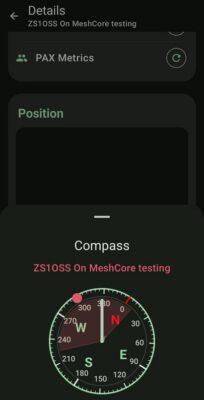
- Location Beaconing – Meshtastic has location accuracy that can be adjusted, and it also has Smart Positioning (Smartbeaconing) which will increase location broadcasts the faster a vehicle or position is changed. Meshtastic is more optimised for mobile use as can also be seen from its compass feature to help you locate another mode. MeshCore can send locations with any text message or by a manual advert from Companion nodes, but it is a completely manual process, no auto-send and no smartbeaconing (unless a Wardriving app or the MeshCore SAR app is used, as the app will do the beaconing).
Migrating to MeshCore
- Most important is that as of May 2026 HAMNET needs to do some testing with MeshCore first, using a test high site, before all HAMNET high sites are migrated. We are using the frequency of 869.618 MHz for MeshCore so that it does not interfere with Meshtastic’s frequency of 869.525 MHz.
- Users flash the MeshCore Companion firmware to their LoRa radio nodes, and install the MeshCore app on their phone or PC to manage it (or there is also a paid MeshOS app, or the free and open source MeshCore Open app too). This can take just a few minutes (similar process to how a user updates their Meshtastic software). It defaults to Bluetooth connections.
- For end users and mobile devices the Companion firmware is best.
- The Room Server firmware is if you want to operate a bulletin board type service, or want to have a node on your roof or building that works like a repeater for devices in the vicinity.
- The Repeater firmware is specifically for higher site repeaters. Neither the Room Server nor the Repeater nodes with be able to receive chat messages of their own.
- Anyone needing to ask questions or get help to getting started on MeshCore in Cape Town, can join the Discord channel for Cape Town at https://discord.gg/wnAZ3qsJU.
How to Flash your Radio and Connect on MeshCore
A good how to flash video at https://www.youtube.com/watch?v=M7Rs_Od1MPI.
Note the Bluetooth PIN is often 123456 if the device does not have a screen. Be patient as many repeaters only advertise once every 12 or 24 hours. Try the flood advert feature and post a hello message in the Public channel and maybe someone will reply sooner.
The video below at https://www.youtube.com/watch?v=TDBkIk2LsPk is also an excellent starter video on how to get going from nothing with the official MeshCore app.
How to Flash your Repeater Node
The principle is much the same as with the companion node, except that by default repeater nodes are updated via USB cable connection (and are managed/configured over the mesh from your companion node. There is an additional flash file (usually with OTAFIX in its name) for enabling an OTA update via Bluetooth if you are close enough to the repeater node. But then you will need to do the drag-the-file-to-flash method when setting the repeater node up: First the ERASE file, then the OTAFIX file, and lastly your repeater firmware file.
NB: Whenever you set up, or even reboot a repeater, the clock will default back about 3 years, so remember to use the ‘Sync Clock’ function in the settings when you manage it from your Companion node.
The video below does a good job of showing how the normal GUI installation works (and update would be via USB cable):
Why 868 MHz in Cape Town and not 433 MHz?
Some spectrum is set aside in South Africa for license-free use for Wi-Fi routers, car remote controls, and various other small IoT devices. No radio license is required in these bands as long as you keep to those frequencies, and also importantly the power levels and duty cycles prescribed. The reason is that these frequencies are shared with many other devices, and any device using too much power or transmitting too long (duty cycle) will block other devices from working. So transmission in these bands are usually short blips only (hence no images, voice, or attachments to messages).
So this is why it is important to ensure the duty cycle is set in the software to 10%, and not left at 50%. The MeshCore software takes care otherwise of the frequency, power levels, etc for you if you have chosen the EU/UK (Narrow), Switzerland preset.
For the license free bands allocated by ICASA for use in South Africa, we have a choice between using the 868 MHz or the 433 MHz bands. Licensed amateur radio operators can also tune their MeshCore nodes to the amateur radio part of the 433 MHz band and use much more power (up to 50 W if they wish) but they lose contact with all the non-licensed users, and encryption must be disabled as no encryption is allowed in terms of the ICASA regulations (worldwide in fact) on amateur radio bands.
Between the two free-to-use bands, the power levels on 433 MHz are limited to 10 mW whilst the 868 MHz band allows for 25 mW and even 500 mW (27 dBm) in a sub-band of the 868 MHz license-free band. So, even though 433 MHz is technically superior to 868 MHz in terms of obstacle penetration and distance, the allowed power levels on 868 MHz make it a no-brainer to choose.
It is also worthwhile to note that hardware devices such as the popular Heltec V3 Wireless Lite Stick LoRa radio anyway have a maximum output of 22 dBm (about 158 mW).
Whilst some other parts of the country the ham operators have chosen full power on 433 MHz, in Cape Town we take a different approach as HAMNET. We got involved in Meshtastic, and MeshCore, because we feel there needs to be a bridge between citizens, ham radio operators, and Disaster Management. HAMNET, and ham radio operators, have very powerful and diverse functioning radios, but they can only speak to themselves using those radios.
There is a need for hikers in wilderness areas without cellphone coverage to be located (like the top parts of Table Mountain), for neighbourhood watches to be contacted by residents if cellphones and the Internet are offline, and similarly to contact Disaster Management for assistance. As we have many ham operators also on Meshtastic (and hopefully soon MeshCore), they can listen and relay messages to Disaster Management locally, nationally, and even internationally if needed. By the way, you’ll usually identify ham operators by their node name starting with ZS1 or ZR1 in the Cape Town area (those prefixes will be followed by 1 to 3 alphabetical letters like ZS1A or ZR1FGH). These are callsigns allocated by ICASA to licensed radio amateurs.
Websites and Links
MeshCore has some sites such as https://meshrank.net/?channel=public and https://map.meshcore.io, where you can see public messages being sent.
Main MeshCore map is at https://map.meshcore.io.
The main MeshCore website is at https://meshcore.io/. For here you can also find the page to flash firmware to radios.
Various MeshCore open source apps and projects are listed at https://github.com/samuk/awesome-meshcore/blob/main/README.md.
There is a very interesting stats and trends site at https://analyzer.letsmesh.net/, but it needs to be noted this only includes nodes that have an observer node nearby which uploads the data. ZR1RF’s site view at https://analyzer.letsmesh.net/channels?region=CPT shows the messages and nodes for the Cape Town region. His view shows Public channel messages as well as the public hashtag channels (not private messages).
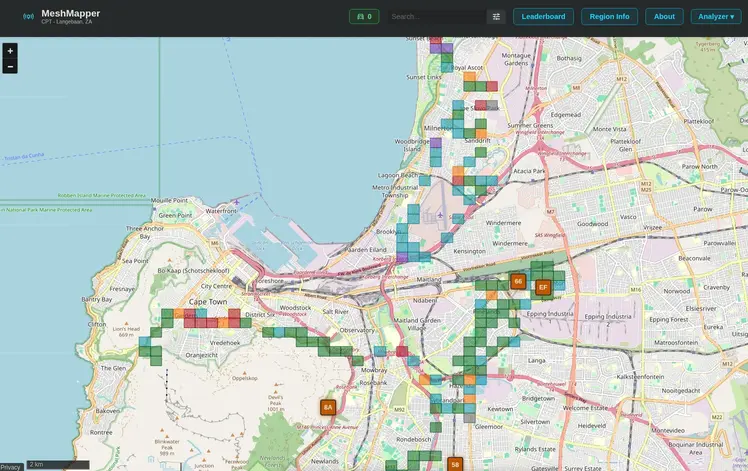
The Meshmapper wardriving map for Cape Town coverage can be seen at https://cpt.meshmapper.net/index.php. If you zoom in closer you can see signal coverage by each small square area. This will build over time as more make use of it. See the Meshmapper app section below for how to upload this data.
Basic MeshCore settings
Flash your firmware from https://flasher.meshcore.io or https://meshcore.co.uk/configurator (2nd link worked better for me).
In the MeshCore ecosystem (especially as of mid-2026), the firmwares are strictly optimised by role:
- Companion (Bluetooth/USB): These are meant for “client” message and chat use. You will also use a Companion node to remote manage any repeater nodes you may be running. To keep the Bluetooth or Serial link fast and low-power, the developers strip out the heavy Wi-Fi drivers. Can toggle repeater on in settings to do some temporary repeating.
- Repeater: This is the “infrastructure” build. It disables all local wireless (BT/Wi-Fi) to focus entirely on routing LoRa packets with zero overhead. You’d manage a repeater node via a USB cable, or from your MeshCore Companion node.
- Room Server: This is the “Hub” build. It is designed to host a bulletin board and a web portal. This is the version that enables Wi-Fi and the Web Interface. By default, Room Servers have “Repeat” turned OFF to keep the mesh quiet. Since this node is on your roof, you should go to the settings (via the Web Interface or Serial) and use the command ‘set repeat on’. You’d manage a room server node via a USB cable, or from your MeshCore Companion node.
- Sensor nodes: Do not have pre-built firmware ready to use as it depends on the hardware type as well as usage. MeshCore has an intro about how to get started with sensors though at https://blog.meshcore.io/2026/09/14/sensor-intro.
The key settings we’d use are:
- Latitude and Longitude can be set as a fixed location (at least some point near where you are). I’d suggest you offset this by 100 m or so to preserve your privacy but still show roughly where you are, and it helps show where repeaters are reachable from on MeshMapper.
- Selected Preset: EU/UK (Narrow), Switzerland – this conforms to our ICASA regulations for use in the license-free band in South Africa
- Frequency: 869.618 MHz
- Bandwidth: 62.5 kHz
- Spreading factor: 8 (bigger spreading factors up to 12 result is longer transmission times for weak conditions, but also use up more duty cycle which means more interference for other devices using the band). Cape Town uses SF8 so you need to use the same to connect with the mesh.
- Coding rate: 8 (default CR to 5 for good stable links. If it is not a solid link and is intermittent, change to CR to 7 or 8). We are using 8 (or shown as 4/8 in some apps) as the standard. The coding rate determines how many extra protection bits are added to the 4 data bits sent in every packet. So a CR 4/8 (or 8) adds an extra 4 bits giving a total of 8 bits to be sent in the packet.
- Transmit Power: 27 dBm is legal maximum for this band, but my Heltec WSL3 for example will give an error if I try to go above 22 dBm as 22 is its hardware maximum.
- Enable repeat mode: Disabled by default. This is for when you are hiking or where no repeater infrastructure exists. Leave is disabled unless you have a specific reason to enable it.
- Duty Cycle: MeshCore’s app defaults to 50% on their app and this is illegal in South Africa. As SA and ICASA follow the ITU Region 1 EU standard for this band, our duty cycle must be set up to a maximum of 10% for the license-free 868 MHz band.
Repeater Settings
After flashing the repeater firmware to your node there are some basic settings that are essential for your repeater to join the mesh. You can tweak many settings later on from your companion node, but the repeater must be able to at least connect to the mesh for that to work. So, set these while you have the node still connected via USB cable after flashing:
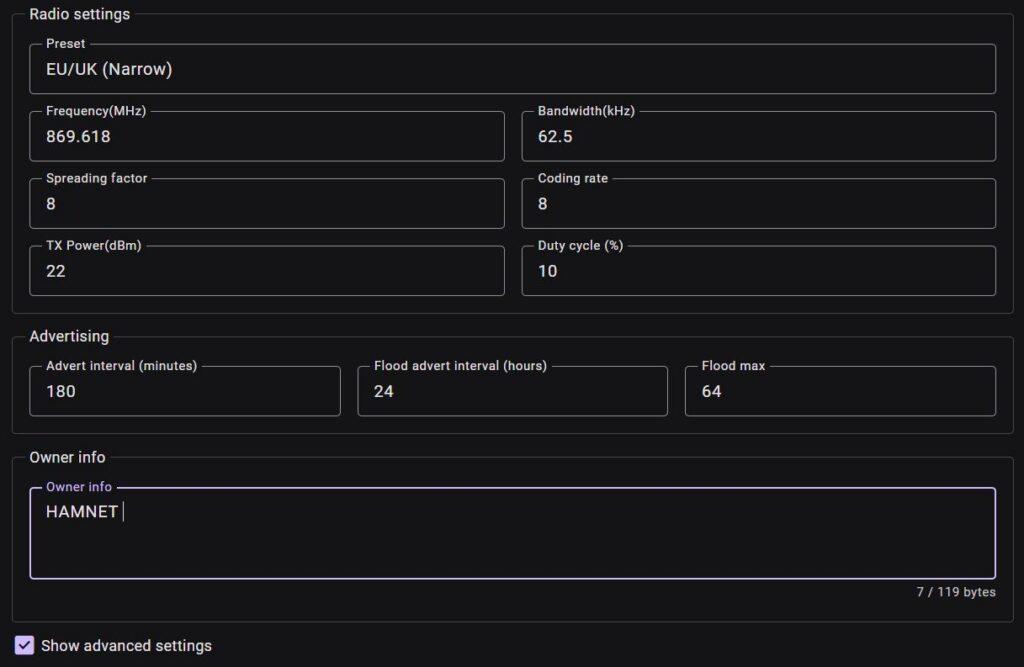
- The repeater must use the same radio settings as the rest of the mesh. In our network this means Spreading Factor 8.
- Coding Rate must match the rest of the mesh. In our network we use CR 4/8.
- Duty cycle maximum must be 10% in terms of ICASA legislative requirements.
- The advert interval is the zero hop advert so does not flood the network. But set it to 180 minutes or longer.
- The Flood advert does flood, so the recommendation is to make it every 24 hours (or even 48).
- Owner info is useful in case someone needs to contact a repeater owner – we usually state HAMNET with an e-mail address.
Position: Set the position for where the repeater will be located.
Sync clock – Always do this after restarting your repeater node. After rebooting, the repeater’s clock starts from its internal default time until synchronised. Always perform Sync Clock before deploying the node. If the clock is ahead of real time, reboot first because MeshCore currently cannot step the clock backwards.
NOTE: If your repeater has a built-in GPS, MeshCore v1.17.0 or later can now sync time and location from the GPS (in testing I’m only seeing the clock syncing from GPS and the location does not seem to update, at least for repeaters). Log into the repeater node from your companion node, go to the CLI, and type ‘gps on’. For some reason it is not always defaulted to on. After that give it 20 minutes or so to settle, and you should see the clock staying correct. Can verify your clock time at https://analyzer.meshmapper.net/?iata=CPT&tab=Analytics&statsTab=clockdrift.
Make sure you do set an Admin password, as this is the password needed to log in and manage the node from across the network.
We leave the guest password as blank. This allows anyone to view the status and telemetry (usually temperature and battery level) as well as access the owner information. The guest password is also used for Room Server repeaters – many set that to empty but otherwise note the default used is usually hello.
The settings below often appear under advanced settings or tweaks.
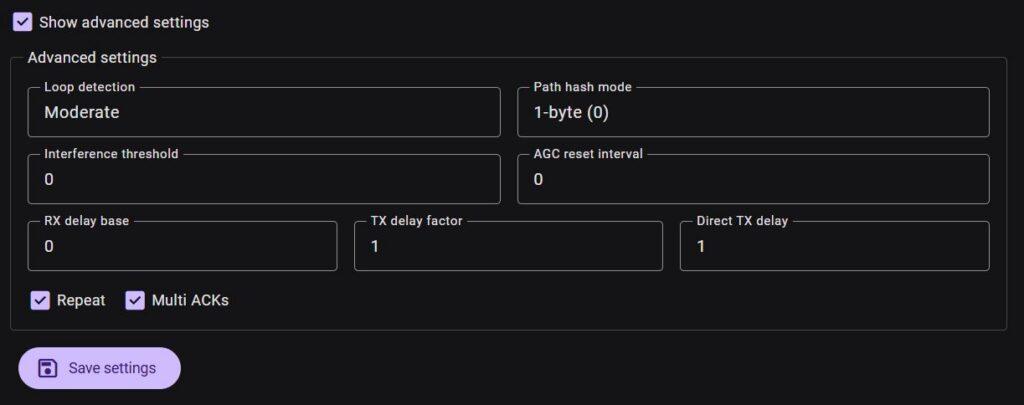
Advanced settings are some additional tweaks as starting points:
- Loop detection – MeshCore uses the repeater path hash appended to packet headers to detect and drop cyclic packets. Set this to Moderate as this strikes a balance and prevents ping-pong loops between neighbouring repeaters without discarding legitimate multi-hop routes. Only mountain top or backbone repeaters should consider being set to Strict.
- Path Hash Mode – Leave at 1-byte (0) unless our entire mesh intentionally migrates to another format.
- RX delay base – this is an SNR-weighted inbound hold time applied before a flood packet is retransmitted. Strong Signals (High SNR): Processed immediately (0 ms hold). Weak Signals (Low SNR): Held in an inbound queue for a few hundred milliseconds to a couple of seconds before forwarding. The goal is to force repeaters on the edge of a cell to wait so that nearby repeaters with strong, clean links repeat the packet first.
- Balcony/local 0.0
- For rooftop 0.0-3.0
- Medium-range repeaters on high buildings or high hills 3.0
- For backbone and mountain top repeaters set it between 5.0 to 10.0
- TX Delay Factor (or called Flood TX Delay) –
- 0.5 for low elevation balconies and local rooftop repeater nodes
- 1.0-1.5 for medium-range regional repeaters on top of buildings, low hills, or where several neighbouring repeaters provide overlapping coverage (in other words also other nearby repeaters)
- 1.6–2.0 for high-elevation backbone or high sites on mountains with a higher delay which gives smaller, lower-altitude repeaters time to finish relaying local traffic before the high-site floods the channel
- Direct TX Delay – this controls the random back off timing for direct (non-flood) messages, targeted node-to-node packets, and ACKs. It is recommended to use 1.0 as this expands the window to ~5 back off slots. This drops packet error rates without adding noticeable latency to interactive messaging.
- Multi ACKs – allows a repeater to aggregate or transmit multiple direct acknowledgments without waiting for individual round trips. This should generally remain disabled except on carefully selected backbone repeaters. In a dense mesh where multiple repeaters overlap tightly, enabling Multi ACKs on every repeater creates localised packet bursts. This can cause hidden node collisions where two nearby repeaters dump multiple ACKs into the air at the same instant, stepping on each other’s signals and degrading total network throughput.
Antenna placement is usually more important than transmit power. A repeater mounted higher with a clear horizon will generally outperform a higher-power repeater mounted lower down. Avoid placing repeaters immediately behind metal roofs, solar panels, or reinforced concrete walls.
MeshCore Tips
- Make sure you are on the correct frequency preset for South Africa otherwise you won’t reach anyone. Cape Town is using the UK Narrow on 868 MHz.
- MeshCore does not actively advertise nodes and repeaters only advertise every few hours. So at first you won’t see anyone – be patient. Read more about discovery at https://nodakmesh.org/blog/meshtastic-to-meshcore-device-discovery/.
- Use the public channel to introduce yourself and hopefully get a few replies.
- Set a fixed location (with maybe a 100 m or 150 m offset) for where you use your node the mode, and tick Share Position in Advert.
- Send ‘Advert – Flood Routed’ once or twice in the beginning to announce your new node to others. This like beaconing on APRS or Meshtastic.
- Another user will only receive a direct message from you, if they have added you to their contact list – so a tip is to otherwise enable auto-adding of discovered nodes to your contact list. It may be a good idea to disable auto-adding of repeaters and sensors to your contact list, and just auto-add contacts and room servers.
- If you are a new user in an area, leave your radio on permanently – otherwise other new users come on the air and can’t find anyone either.
- If you do activate the repeater function on a companion node, it changes you away from the mesh frequency, and does not restore the mesh frequency after you toggle it off again. Remember to go set your preset frequency again for your region. The reason for this is to not break the static learnt routes that have been built up, as your mobile repeater would introduce new routes which would disappear as you move position.
- If you need help you can also try the Discord server for Cape Town or for South Africa. The South Africa server was a Meshtastic only server, but by end of May 2026 is expected to include MeshCore for users across the country.
Add yourself to the MeshCore Map
To add a BLE Companion radio, connect to the BLE Companion radio from the official MeshCore smartphone app. In the app, tap the 3 dot menu icon in the top right corner, then tap Internet Map. Tap the 3 dot menu icon again and choose Add me to the Map
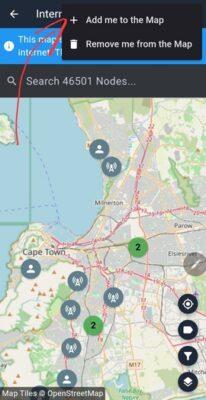
To add a Repeater or Room Server to the map, go to the Contact List, tap the 3 dot next to the Repeater or Room Server you want to add to the Internet Map, tap Share, then tap Upload to Internet Map.
You can use the same companion (same public key), that you used to add your repeaters or room servers, to remove them from the Internet Map.
MeshCore Official App Frequently Asked Questions
See https://github.com/meshcore-dev/MeshCore/blob/main/docs/faq.md
Which Companion Node Chat App To Use
That is your own choice, but you can switch between different apps to test them. Only one app can connect to a radio at a time. The one connected, will receive any new messages, whilst the others won’t show those messages later on, so switching back and forth is not always a great idea.
MeshCore – the official MeshCore app. Free to use but logging into a room server or repeater will have a few seconds delay unless you pay the once-off fee. A plus is you can set custom names for all your contacts, and on the map tools you can also see an antenna coverage map. The mobile app is not open source.
MeshOS – Andy Kirby’s mobile app. This is a paid app with a once-off activation fee. It is pretty cheap for Android phones, but is nearly three times the cost for a version for a T-Deck, T-Pager, or T-Display (but does offer great functionality for these devices). The app also has AirLink connectivity to connect to other phones nearby which also have MeshOS on them. The app is not open source.
MeshCore Open – completely free to use and also fully open source. It has no delays opening remote management for repeaters or room servers. Whilst it does not have the antenna coverage tool, it has a better line-of-sight map tool than the official MeshCore app has (it shows on the map where obstructions are). It has more configure-ability than the other two apps above e.g. apart from just more information about paths (shows graphical paths between repeaters on map) and display options (like zooming text bigger), it also has built-in reaction emojis, many filters on the map view, a time-graph showing the noise floor over time, a choice of battery chemistry per device, offline map caching, auto-translation (using Hugging Face AI models), etc. It does not yet have custom name setting per contact.
MeshCore One – is an open source app for iPhone, iPad, and Mac.
Tip: If you have two companion LoRa nodes, then you could use one app to stay connected to the first companion node, and use a different app to stay connected to the second companion node.
How Duty Cycle works
Duty cycle is a regulatory restriction imposed by authorities (like ICASA in South Africa or ETSI in Europe) to prevent network congestion in license-free ISM bands. Because these frequencies are shared, no single device is allowed to hog the airwaves.
As mentioned above there is a legal restriction of a 10% max duty cycle allowed in South Africa on the 868 MHz band used by MeshCore. A 10% duty cycle means a radio can transmit for a maximum cumulative total of 6 minutes per hour (360 seconds) within a specific frequency band, remaining silent for the other 54 minutes. The actual number of messages you can send depends entirely on your payload size and LoRa spreading factor (SF), which dictate your Time-on-Air (ToA).
This is total transmission time, so traffic forwarding, acks, and retries are all factored in as transmission time. The good news is it does reset after an hour.
But a very rule of thumb calculation shows that per message about 164ms is used. So a maximum of about 2,190 to 2,195 messages could be sent per hour before you exceed that 10%. This is with the Spread Factor (SF) of 8.
Which in theory also means, without the flood routing that Meshtastic uses, MeshCore should have more time available for actual messaging than Meshtastic has.
Spreading Factor (SF)
LoRa uses Chirp Spread Spectrum (CSS) modulation. Information isn’t sent on a single static frequency; instead, the transmitter sweeps across the channel frequency (a “chirp”).
SF controls how fast a LoRa chirp sweeps across its frequency band: lower SF means shorter airtime transmission, but better signal-to-noise ratio needed to decode the message (likened to normal speaking voice), while higher SF means longer range and better resistance to noise (likened to shouting words slowly).
Lower SF also means less duty cycle use, more can use band at same time. We need to use the same SF to connect across the mesh.
MeshCore Channel Types
As mentioned before, MeshCore has no hard limit set for channels. Channels are very useful not only for private group chats, but also for moving some busier chats off the Public channel. Ideally everyone wants to have notifications on for the Public channel, but you can mute some of the hash channels you are not interested in being alerted for every message posted.
When we get to the point of having weather alerts broadcasted by bots, or sensor information by someone monitoring the water level of a water tank at a remote location, etc, you don’t want this all on the Public channel. Consider putting this traffic on a hash channel or a private channel. It will keep the Public channel clearer urgent alerts or just finding someone and then moving off to another channel.
None of this is law, it is basic good etiquette, and becomes more necessary as we reach 100, 200 or 300 plus users.
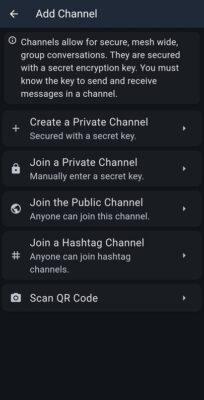
1. The Public Channel (#public)
- Purpose: The default entry point for all new nodes. Everyone hears a message broadcast in this channel (if you have your notification alerts on for this channel). It is also the primary channel to make contact with others. Because it notifies everyone, the ideal is to move some types of traffic off this channel, to keep it for calling and important alerts. Try not to have long back and forth conversations here as 100+ other nodes will be alerted of every message sent.
- Encryption: None. All traffic on channels starting with
#is unencrypted (plain text), allowing anyone with a compatible LoRa radio to read and participate. - Behaviour: Uses a “flood” mechanism where repeaters rebroadcast the message across the entire mesh. There is no delivery confirmation (ACK) for these messages.
2. Private/Encrypted Channels
- Purpose: For secure group communication. This could be for a neighbourhood watch, a family, a group of friends, the HAMNET group, a church, Disaster Management, etc where the information needs to be encrypted and kept private. A new user would need to be given the key to access the private channel.
- Encryption: Uses AES-256 (or AES-128 depending on firmware version).
3. Regional/Hashtag Channels (#cityname, #ham, #test)
- Purpose: Community-driven rooms for specific locations or interests (e.g.,
#capetownor#emergencyor#fishing). There could be a #newusers channel, or a#testchannel, or anything else. We have created for Cape Town a#channel1and a#channel2. The idea behind this is once two or more people have made contact on the Public channel, they can move to#channel1or#channel2(or create their own hashtag channel), and continue the discussion there. Others can mute those channels to keep their alerts enabled on the Public channel without being disturbed by a long discussion. These types of channels are also ideal for suburbs such as#claremontor#melkbos. - Visibility: These appear in the “Discover” list of the MeshCore app, making it easy for travellers or new local users to find the right frequency/logic group. There is no private key needed to join these hashtag channels, so just remember they are public (but separated virtually from other discussions).
MeshCore Regions
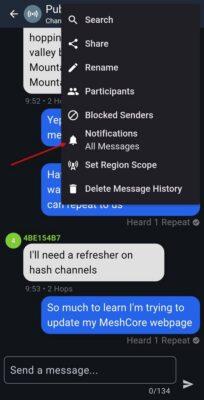
In MeshCore, Regions are logical geographic or organisational boundaries used to scope channel traffic and control which repeaters forward which messages. Instead of letting every message flood a massive, multi-city backbone, Regions allow you to restrict high-traffic public chats to local areas while preserving the primary backbone for critical long-distance communication, massively reducing radio congestion and protecting your duty cycle.
Regions are a feature built directly into this infrastructure (managed via the MeshCore app and repeater firmware). They function as a “traffic gatekeeper.”
- On Channels: When you send a public channel message, you can scope that channel to a specific Region.
- On Repeaters: A repeater administrator assigns the repeater to one or more Regions. The repeater will then look at incoming packets and only rebroadcast them if the message’s scoped region matches the repeater’s allowed regions.
This explicitly prevents a hyper-local conversation in one neighbourhood from flooding a repeater chain across an entire metropolitan area.
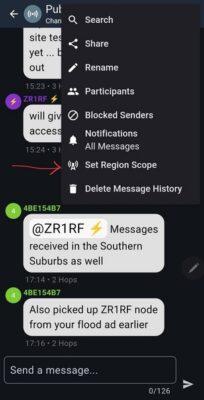
Right now in Cape Town we are not using regions so all traffic floods across all repeaters to all nodes. But we could have the backbone high site repeaters set to a region say City-Wide, whilst maybe a few repeaters in the South Suburbs are set to Region Southern-Suburbs and City-Wide. Then anyone sending in the Public channel with their region scope set in their public channel to Southern-Suburbs, would only be repeated through repeaters with their Region set to Southern-Suburbs. If the Public channel region scope was set to City-Wide, the local repeaters would repeat it if they have City-Wide whitelisted in the region settings, and backbone high site repeaters would pick it up and would repeat it city wide.
Note when setting region scope in a Companion node’s Public channel, only one region can be set at a time, and it only affects sending. That Companion node will still receive all messages. Region scoping is really a whitelist filter that is applied for traffic through repeaters.
Using APRS with MeshCore?
There is no built-in support for this. The most common method though to achieve this is through MQTT-to-APRS Gateways. You configure MeshCore to push data to a private MQTT broker. A secondary script (like aprstastic or custom Python bridges) then parses the location packets and injects them into APRS-IS.
Mobile Use
Ham operators use APRS a lot for beaconing positions while mobile or doing rescue and disaster management work. There was some success with this on Meshtastic (which has been around longer and has GPS accuracy offset, as well as smart beaconing which transmits more often when moving).
NOTE: The position around MeshCore is changing from May 2026 as more apps are appearing for it. Companion radio nodes do not advertise their location (apart from inside manual flood adverts or when messaging) but MeshCore apps can more actively push locations through the radio companion node, such as Meshmapper or the MeshCore SAR app.
MeshCore has fixed position as well as accurate GPS location it can send. A user can toggle on the location sent with adverts. What I have noticed is if the fixed position (which I offset a bit) stays set, when I turned the GPS location on, it was sending out the GPS location, so all good there. Just note that when you toggle the GPS location off, the radio’s fixed location settings will now be the last GPS location.
It was just not smartbeaconing or sending location often enough. Probably because the default is more for fixed nodes, so a location flood packet only gets sent every 6 or 12 hours, and ONLY for repeater and room server nodes. So the steps to make it at least meaningful when mobile (not for fixed locations or repeaters) are:
1. Turn on GPS: Settings -> Position Settings -> Enabled.
2. Share Position in Advert: Can toggle on in the main Settings in Public Info section. This means any message sent will include the location.
2. Telemetry (I have this on all the time as I fudge my fixed location: Settings -> Telemetry Settings -> Include Location in your Telemetry -> Yes (but someone has to then pull your telemetry to view it).
3. Sending Adverts with Location Frequency: This CANNOT be set in Companion nodes at all. The intention was to keep the network traffic quiet. It also has no smartbeaconing to send more frequently when moving. This can be set for repeaters, but they don’t receive or send chat messages at all. But even repeater nodes won’t let you send every minute or 5 (I think it is 60 minutes minimum).
So how do I send location then for companion nodes?
Well only two manual ways really with the official apps:
1. Any messages you send while travelling will include the location if you have enabled it.
2. Manual Advert: Via that signal icon at top of the screen to either zero hop (those in range of your radio) or Flood Routed (which gets repeated across the network updating everyone).
So if hiking then any message you send, or if you do an Advert Zero Hop, will send your location to others nearby.
OR you use a different app like Meshmapper or the SAR app (see below).
Meshmapper
There is a mobile app called MeshMapper. MeshMapper is explicitly built for wardriving/coverage mapping with MeshCore nodes. It connects to your companion hardware via Bluetooth and does feature intelligent GPS automation:
- To prevent flooding the local mesh when you are stationary, it features an automatic timeout that ceases all pinging after 30 minutes of zero movement.
- It sends automated, GPS-tagged pings to map out nearby repeaters.
BUT the use of this app by a few people with Active pings too frequently, may end up flooding the network with location packets across all repeaters. So it is not something for daily use. Also, it has no chat or messaging inside it.
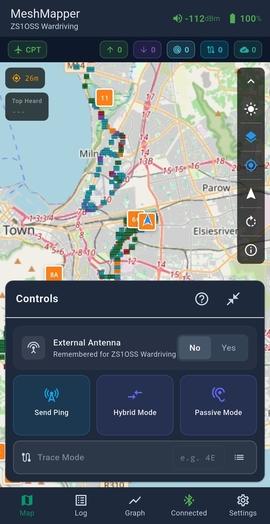
Steps to use it after you have installed it, are to press the Connect button at bottom of the screen, and connect to your node. The button changes to Connected and a green colour.
Meshmapper main activation options are (these start/stop the functions):
- Send Ping (Active Mode): Manually triggers or schedules automatic telemetry pings at set intervals. This transmits a packet through the mesh network to actively test bidirectional routing paths and verify which repeaters hear and acknowledge your station. In settings there is a Ping Settings section, where you can set Auto-Ping interval and Min Ping Distance (if driving make the distance at least 100m or 200m. Also toggle on Auto-Stop after idle.
- Passive Mode: Completely mutes transmissions from your radio. It acts as a local RF sniffer, logging incoming packets and using the mesh network’s discovery protocol to identify nearby repeaters based strictly on traffic heard over the air without adding load or overhead to the channel.
- Hybrid Mode: Combines both strategies. It prioritises quiet passive listening to minimise channel congestion but will selectively issue a structured discovery ping if it notices an unfamiliar or new repeater beacon, mapping the node without continuously flooding the area with telemetry.
Meshmapper uses the phone’s GPS only, so you can use companion nodes that have no GPS module, and you need not toggle on the GPS functionality in the Companion node either.
The external antenna toggle is intended to just indicate whether it is an antenna on the top/roof of a vehicle, or one inside. It is more to allow for signal differences when reported on the map.
It is possible to connect both a Meshcore messaging app and Meshmapper to the same node, but there can be clashes. While both look connected, Meshmapper retains primary control over transmitting commands (like manual pings or mode toggles). If you try to send a text message or change a hard setting inside the Meshcore app while Meshmapper is aggressively polling or tracking in Hybrid/Active mode, you will experience packet collisions, dropped commands, or a momentary freeze in one of the apps as they fight over the serial pipeline.
Ideally you want to have a second companion node that you can use just for wardriving or SAR (including hiking etc) work.
Ongoing growing coverage data for greater Cape Town can be viewed online at https://cpt.meshmapper.net. This is the ONLY MeshCore app that I’m aware of, that will upload real-time location to an online map, but the map will only show what block the node is in, not the precise GPS location.
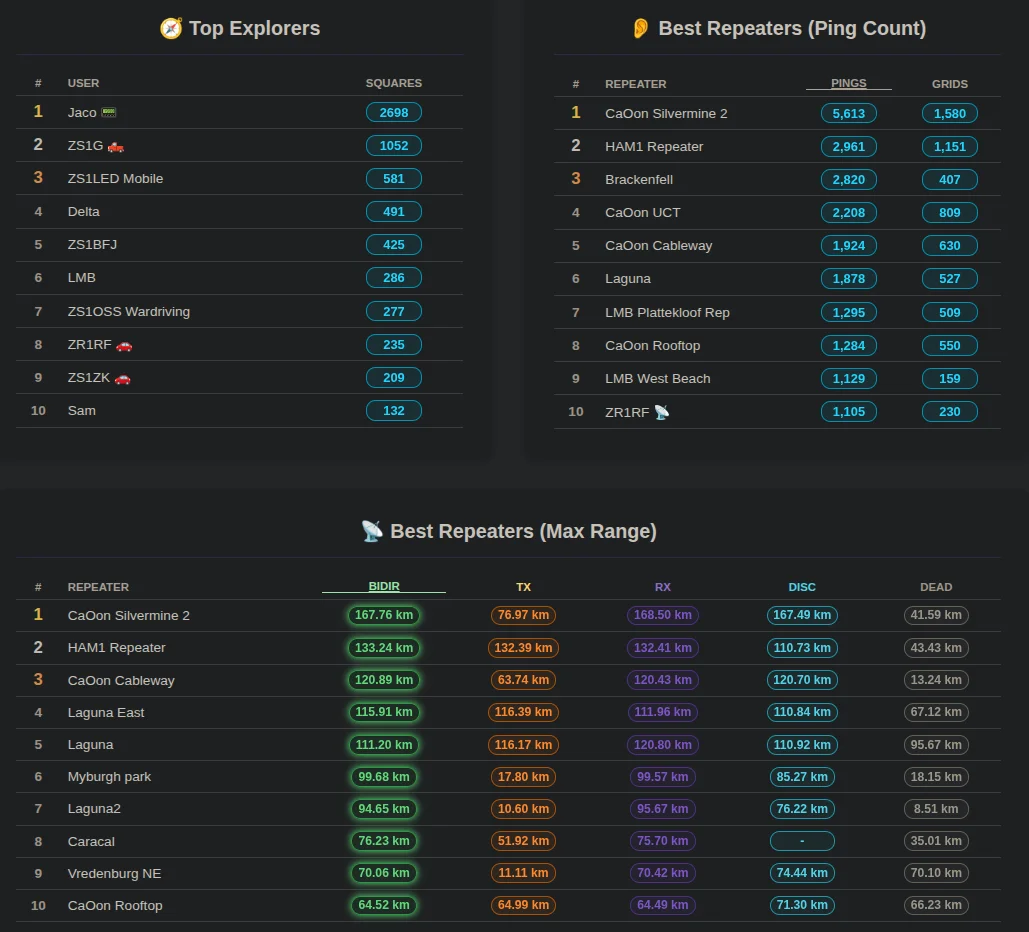
Meshmapper also has a strong gaming element to it as can be seen from the leader board view below. It is not just about the wardriving explorers, but also how well repeaters are doing.
Mapme
MeshMapper is a native, feature-dense mobile application designed for deep protocol diagnostic mapping (via active/hybrid ping tracking), whereas mapme.sh is a lightweight, web-first platform emphasising simple passive collection and competitive gamification.
Mapme.sh requires screen on (or 3rd-party MapMe.sher app) whilst MeshMapper has native background execution with BLE disconnect alerts. Neither system uses standard email/password authentication. Both automatically provision user identity and profile stats by reading your Companion node’s explicit hardware name and cryptographic signature when you broadcast an over-the-air advertisement packet.
Add yourself to the Mapme Map
mapme.sh is a crowdsourced RF coverage mapping platform for the MeshCore LoRa mesh network. It visualises real-world signal range, flags network dead zones, tracks active repeater metrics, and uses gamification to encourage users to map their local infrastructure. Unlike theoretical signal models, mapme.sh displays where MeshCore packets can actually be received on the ground. By aggregating telemetry into an H3 geospatial hex grid, it colour-codes coverage from excellent signal strength (Green, >-80 dBm) down to marginal limits (Blue, <-125 dBm) or complete dead zones (Gray, visited with no signal).
The public map allows network operators to inspect the performance of individual repeaters. You can see how far a specific node’s signal propagates and evaluate where the physical topology lacks links. This data is critical for:
- Finding optimal physical locations for new high-site or rooftop repeaters.
- Eliminating local dead zones in community emergency communication setups.
Instead of a single admin testing a whole city, mapping is entirely crowdsourced. Mobile mappers load the web app, connect their hardware, and go about their day (driving, hiking, or commuting). The app captures passive packet traffic (RX) and handles automated active discovery pings (TX) to continuously stress-test the local grid mesh.
Note: If an operator prefers not to have their hardware mapped, adding the 🚫 emoji to their MeshCore node name instructs mapme.sh to automatically filter it out from public rendering.)
Disconnect your Bluetooth from your Companion node. Open https://mapme.sh/connect in your phone’s web browser (some browsers may require you to allow Bluetooth web API permissions). It uses the Web Bluetooth API in your mobile browser to pair directly with your MeshCore Companion hardware. It fuses your phone’s internal GPS coordinates with the real-time RF signal data (RSSI / Node IDs) captured by the radio, uploading this metadata to a central server to plot network coverage within an H3 hexagon grid.
The site silently maps coverage simply by cataloguing ambient mesh traffic as you move through different areas. If the mesh environment is silent, the platform triggers an internal discovery beacon automatically every 30 seconds. This prompts surrounding nodes and repeaters to respond, validating whether a link can be completed from your current location. You can also manually trigger a ping every 2 minutes.
If you are using Brave
Brave completely isolates Web Bluetooth behind a proprietary feature toggle.
- Change the dropdown selection from Default to Enabled.
- Click Relaunch at the bottom of the window.
If you are using Chromium or Vivaldi
On standard Linux Chromium builds, the API is often hidden behind the experimental platform flag.
- Toggle the flag to Enabled.
- Restart the browser.
MeshCore SAR
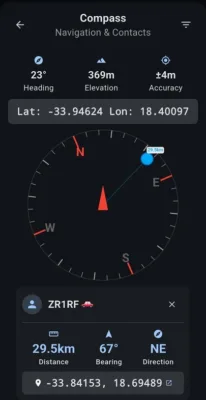
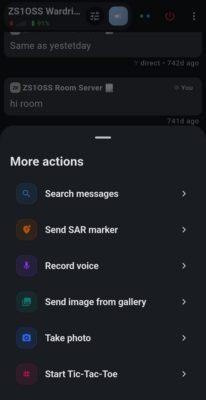
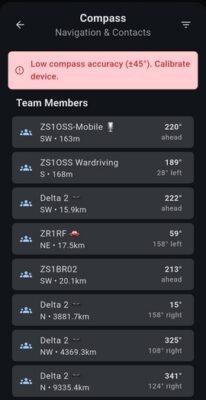
This app is intended for use by search-and-rescue, hikers, etc where active location tracking by team members, placing of markers, sending voice clips when you cannot type, sending low-res images, rapid chat/messaging, movement trails, etc are required. Details and installation is available from the project at https://github.com/dz0ny/meshcore-sar.
NOTE: Due to its nature of rapid messaging, location beaconing, and even voice clips being sent, this app will very likely override the legal limits for the duty cycle of 10% per hour for South Africa. So it is best used in real emergencies or else when out in the countryside or where there is no network coverage. It transmits your real-time precise location, so if you abuse it, you can be found and identified. This is not a stealth app or a privacy based app at all. It is intended for operators working in weak/no cellular coverage areas.
Its settings allow you to set a movement threshold (adjust this to 150 m or higher to transmit less often, and the active-use update interval (again set to 60 s or 120 s to transmit less often). The Fast private GPS updates toggle, is to send out more often as zero-hop packets so that only local radios that receive you will hear the location pings i.e. local rescuers or your fellow hiking buddies. Choosing a hashtag channel to send this to, “may” (must be verified) make the location available to other users who have access to that channel. It changes the local node’s configuration dynamically to broadcast location data that drops off after 1 or 2 repeaters (or within a localised geo-corridor), which prevents the packets from bouncing across 3 states and polluting the wider network.
If someone wanted to be tracked in real-time on a map, it could be possible with MeshCore SAR if the GPS location is set to be sent say to a #sar channel, and someone has a gateway that monitors that channel and uploads the beacons to an online map. As a rule, do not broadcast location data from this app to the Public channel.
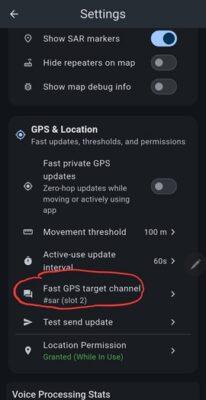
Also note that on exiting this app, your fixed location for your LoRa radio settings will have been updated to where you exited the app (it basically updates the location from the phone’s GPS while app is in use). So remember to set your fixed location back to where you want it afterwards.
Whereas the Meshmapper app has no messaging and is intended for analysing coverage across different areas, the MeshCore SAR app does have normal messaging built-in and is intended for real-time zero-hop location tracking between friends or team members. BUT, apart from contact and channel messaging, it will only communicate for object markers, live location, etc to other users with MeshCore SAR active. It works in offline mode, so no data is being uploaded to any online maps.
This app could be used for very mobile users, as long as you relax the amount of GPS transmissions in the settings. It will though send your precise location out in real-time. The Meshmapper app, could otherwise be considered as an alternative as it can also optionally send out a live or delayed location, and it does not share the precise location (just the map square that you were in).

Above are some default templates that MeshCore SAR has. These would be used to quickly place markers on the map with some key information. Custom templates can be created to suite whatever your specific purpose is. They can be exported and shared with others.
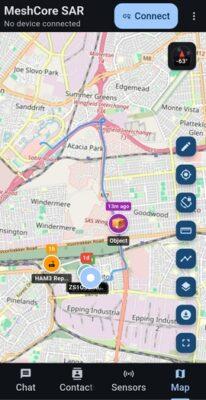
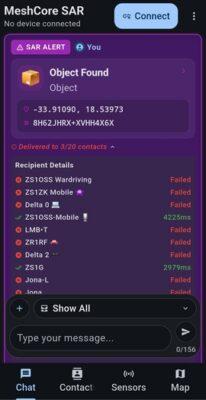
MeshCore TEAM
Similar to MeshCore SAR but a lot more basic. MeshCore TEAM does not have the templating and navigation options, but it does also have basic messaging, offline maps, waypoints, and location sharing included.
Routes let you draw multipoint paths on the map — useful for marking trails, patrol routes, or planned movement paths.
Something of interest is that it has smart forwarding — app-managed multi-hop routing (forwarding policy engine). So it looks like this app can do built-in repeating much like Meshtastic does. But it states that forwarding is available when the companion radio runs custom firmware that reports forwarding support. So this may be a small hurdle for many.
MQTT Support
MeshCore supports MQTT integration, but because of its architecture, it is handled differently depending on whether you are using an infrastructure node (Repeater/Room Server) or an external application bridge.
Unlike Meshtastic, which has a unified client-side MQTT proxy toggle directly inside the standard mobile app, MeshCore splits MQTT functionality into native infrastructure firmware and dedicated bridge tools.
1. Native Repeater & Room Server MQTT
If you are running a stationary backbone node (such as an ESP32-based repeater or a dedicated Room Server), the native MeshCore firmware includes a dedicated MQTT module. This allows the node to act as an MQTT Gateway, bridging local RF LoRa traffic to an IP backhaul. The node converts incoming LoRa Protobuf packets into standardised JSON payloads and publishes them to your broker. Conversely, publishing a JSON payload to the correct command topic instructs the gateway to transmit that message out over the RF mesh.
2. The MeshCore MQTT Bridge (Application Layer)
If you want to pull data directly out of your client environment or interface with home automation, the official ecosystem utilises an independent service worker known as the MeshCore MQTT Bridge (meshcore-mqtt).
This Python-based service establishes a persistent runtime connection to your node (via Serial, BLE, or TCP) and acts as a bidirectional message bus translator to an MQTT broker. This is the preferred method for feeding local data into systems like Home Assistant or tracking dashboards without overworking a battery-powered companion radio.
Monitoring and Bridging Apps
There are some services that can monitor and visualise what is happening on the RF mesh network. These generally involve having a node listening for messages, which is connected to a computer via a USB or serial interface, and is then able to process and display that data on a webpage.
MeshCore Analyser – does this via observer nodes.
MeshMonitor – a comprehensive, self-hosted web dashboard designed to manage, monitor, and map off-grid radio mesh networks. It acts as a central administration and visualisation platform, seamlessly aggregating data from Meshtastic, MeshCore, and MQTT backbones onto a single unified interface.
Mesh Live Map – a traffic map that renders nodes, routes, and activity in real time on a Leaflet map. The backend subscribes to MQTT over WebSockets+TLS or TCP, decodes MeshCore packets with the official @michaelhart/meshcore-decoder, and streams updates to the browser via WebSockets. If a mobile companion node is beaconing its location automatically (for example, by running the MeshCore SAR app or a dedicated asset-tracking binary), the map backend processes the incoming coordinates instantly. The node icon shifts across the browser map in real-time.
Growth in Cape Town
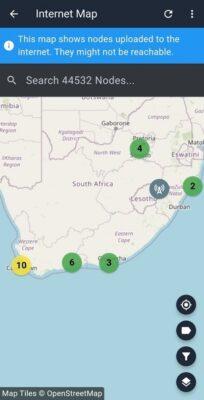
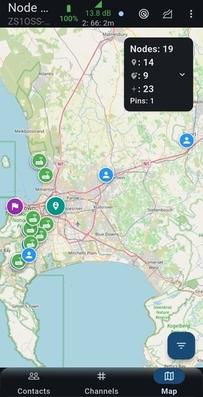
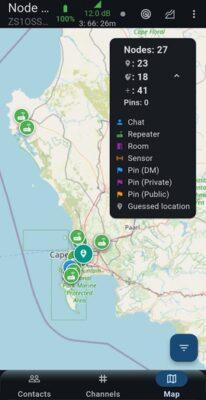
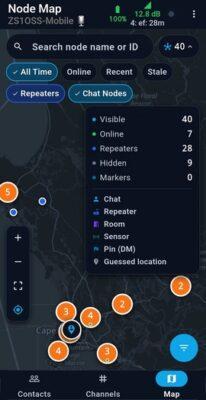
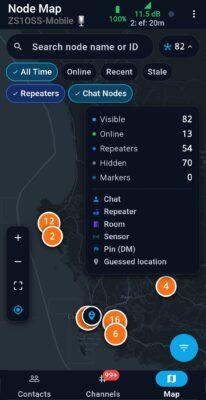
A snapshot from the MeshCore map shows Cape Town has already pulled ahead of other regions on South Africa. It’s no surprise though as with Meshtastic we also had more nodes in the Western Cape than the rest of the country added together. Vredenberg to the North of Cape Town by about 110 km is connected, as is Worcester to the East over the Hawequa mountain. The furthest single hop bidirectional connection is 180.45 km which was to Piekeniereskloof Pass just South of Citrusdal.
Tips for the open-source MeshCore Open app
This is an amazing fully open source app, but there were some things I only learnt after quite a bit of searching, so I’ll add some tips to get others to fall in love with it quicker (view online docs at https://meshcoreopen.org/docs/getting-started/):
- The default font size is small – use pinch and zoom to zoom it bigger. Double tap to reset the zoom and change it.
- Reply quickly to someone’s message – drag their chat bubble left, and you have a quick reply.
- If you manage any repeaters or room servers, this app will give you full management of them, including sending a manual flood advert – to access just log press on your repeater/room server in the contacts list, choose Room Server or Repeater Management, and put your password in.
- To view the path of a chat message – go into the chat and tap on the message. That opens a Packet Path screen showing the repeater hops it went through. If you tap on the map icon at the very top, it also opens a map view.
- This app does not share location to the MeshCore Internet map like the MeshCore app does
- It can however cache map tiles for offline use, and by long pressing on a spot on the map you can share a marker with a description for others to see (via RF).
- It has an optional AI auto-translate to and from various foreign languages. To enable this, you need to download the AI model for use offline (works without the Internet). This is all done in the app’s settings so no low level knowledge required.
Diagnosing Issues
- Check Radio Settings and whether Client Repeat is toggled on. That shifts your frequency off the main mesh frequency. It should be off for Companion nodes.
- Clock time: Make sure it is correct as messages will send, but I did not see them when viewing on the MeshCore Open app. The reason was that app sorts the feed by “time sent” so the messages were there, but a few hours earlier in the feed.